Digital Storytelling is a wonderful phenomenon which has taken off in the last couple of years. I found a YouTube video which explains digital storytelling in plain English. Since I wasn’t sure if there was a specific idea for the storytelling, the video thoroughly explained the idea to me. Digital Storytelling is actually very simple and is easy enough for anyone to do. The idea is to use digital media like a PowerPoint, video, podcast, or an animation to explain an idea. The idea is not to just explain an emotion or how your day has been going, but to make a digital story which helps people understand how to do something, like a mathematical equation. These digital stories are far easier to make than anyone could have guessed and I recently made one without even realizing it. All you need to get started is a camera or video camera which easily converts the files onto your computer, a computer, and editing software. Once you have decided what you are going to be explaining you can add the videos, captions, transitions, music, and even a voice over. Digital Stories no longer limit your audience to being the people who are around and can hear what you are saying. The storytelling and animation can travel through the internet to anyone you want to see it. Even posting these stories on YouTube attracts more viewers than you would have thought possible.
Wednesday, July 20, 2011

Wednesday, July 13, 2011
Connecting the Education World
As I began to look for communication systems, I found a company called Sun. In 2008 Sun launched two different portals or web programs for the education community to use to communicate about education. One of the portals is used to connect the educators and people from the education community. The second is for students who are interest in these tools and communicating. The first portal is called educonnect.org. This site allows schools from across the nation enter in their information about new technologies for schools and allows Sun to engage and support the educational community. This program works to find out the information about the technologies, give all the information about them good and bad, and provide support for solving technology issues. There is also a link on the page called parish web portal. This sounds almost like a home page for people to get to know you and then interact with others. The second program is called Open Source University Meet Up. This site was created to help students connect and share information about tech tools like Java. The site lists several times and places where groups of students will meet up to have conversations and ideas about them as well. In a way both of the websites connect the world of students and of educators. May people can see what students are thinking about the tech tools and the same with the education world. Sun also supports a program which creates a virtual classroom. This is a free and open program called Project Wonderland. There are also digital libraries and identity software to make sure that once a student logs in, they are who they say they are. This website is full of wonderful information and a world which little people know about. Virtual Classrooms are becoming more popular in the education world and it is important for many educators to understand and navigate them. The website that had the article about these programs is http://sun.systemnews.com/articles/128/5/opt-edu/20800.
The virtual classrooms are like any classroom with students asked to raise their hands and provide wonderful points on readings and the class homework. The conversation revolves around educational technology as well for the web sites.
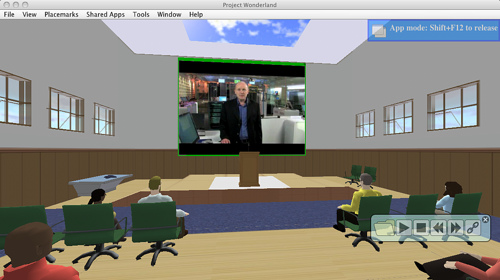
This is an image from Project Wonderland.
The virtual classrooms are like any classroom with students asked to raise their hands and provide wonderful points on readings and the class homework. The conversation revolves around educational technology as well for the web sites.
This is an image from Project Wonderland.
Growing by Reading Blogs
Unfortunately the site that have been fallowing chose to close its doors recently. However, all the information that the author put into the website is still there. I looked at three different posts from http://www.assortedstuff.com/top101/. The first blog I looked at was about the Exploratorium which is a hand on museum in San Francisco. Since most of our students can just jump on a plane and fly there to get the experience this blog gives a link to a web site which allows teachers the opportunity to recreate some of them. One that I looked at was about using mirrors to make a person look like they are flying. Students would love these activities and they don’t seem to complicated. The second blog post was about the red wood forest. Since students can only see pictures and videos of the monumental sites the blog gives the website for national geographic. This web page gives students, parents, and teachers the opportunity to see these exhibits through interactive web pages and vivid photography. The last blog that I looked at was about Evolution. First off, I love that the author mentioned how some people might not like this topic, but that they had resources or those who wanted them. The blog listed a website which has a mind map. All of the side words you can click on and you can receive all the information you ever wanted to know about understanding evolution. This website with the 101 websites is a vital bit of information. I think it is great that someone compiled some of the best websites so that teachers can easily navigate the area to get the information they need. Without other teachers sharing their knowledge about these ideas, some may never grow. I think this site, along with many others allow teachers to grow and get many phenomenal ideas and understand what they might be doing right or wrong in the classroom.
Tuesday, June 28, 2011
Helping our Autistic Children
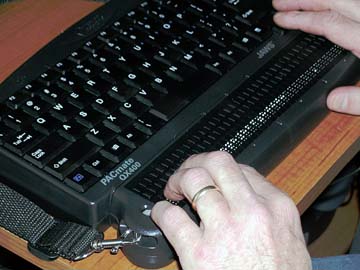
According to Access IT, assistive technology is used for students with disabilities which might not be able to perform the function without the technology. This technology is includes everything from wheelchairs to special keyboards on computers with brail for blind students. There is a lot of assistive technology out there for all different types of disabilities, but there is always more needed. The goal is to allow students with disabilities the same opportunity as every other child. Technology-Related Assistance for Individuals with Disabilities Act of 1988 stated that assistive technology is any technology or item which increases, maintains, and improves the capabilities of students with disabilities.
Autism has been a growing problem for children in America. Now 1 in every 200 students is diagnosed with some form of autism and researchers have little if any evidence where it came from and why our children are ending up with it. There has also been less than satisfactory research and attention on assistive technology for these students. There are a lot of different components of autistic disorder which prohibits students from learning like other students. These assistive technologies are use to try to help students with autism have a better understanding of their environment, acquire better communication and social skills, have better attention and focus. These technologies are used to help motivate, organize, and help with academic skills. The main goal for these assistive technologies is to help autistic students work into society and learn their own self help skills.
Autistic students respond far better to visual stimuli than any auditory or kinesthetic activity. Teachers are often recommended to give them visual schedules and instructions. One program which helps these students with this visual learning style is Boardmaker, a program created by Mayer-Johnson. There are over 3000 picture word communications with show pictures along with words or sentences. This is a great tool for autistic children because they are able to see and understand something in a visual way.
These technologies are always growing and changing in the education world. As a future educator it will be hard t keep up with all of them and if you think you can, you are crazy. However, if you do nothing and simply use what you were taught, you are not using all of your resources. These students need these assistive technologies so it is a teacher’s job to supply them with them. You can stay connected through the internet and all of the web resources, like blogs. Also taking a few classes would allow you to stay up to date and connected. All of the resources are out there so it is up to you to use them to your advantage.
Autism has been a growing problem for children in America. Now 1 in every 200 students is diagnosed with some form of autism and researchers have little if any evidence where it came from and why our children are ending up with it. There has also been less than satisfactory research and attention on assistive technology for these students. There are a lot of different components of autistic disorder which prohibits students from learning like other students. These assistive technologies are use to try to help students with autism have a better understanding of their environment, acquire better communication and social skills, have better attention and focus. These technologies are used to help motivate, organize, and help with academic skills. The main goal for these assistive technologies is to help autistic students work into society and learn their own self help skills.
Autistic students respond far better to visual stimuli than any auditory or kinesthetic activity. Teachers are often recommended to give them visual schedules and instructions. One program which helps these students with this visual learning style is Boardmaker, a program created by Mayer-Johnson. There are over 3000 picture word communications with show pictures along with words or sentences. This is a great tool for autistic children because they are able to see and understand something in a visual way.
These technologies are always growing and changing in the education world. As a future educator it will be hard t keep up with all of them and if you think you can, you are crazy. However, if you do nothing and simply use what you were taught, you are not using all of your resources. These students need these assistive technologies so it is a teacher’s job to supply them with them. You can stay connected through the internet and all of the web resources, like blogs. Also taking a few classes would allow you to stay up to date and connected. All of the resources are out there so it is up to you to use them to your advantage.

Tuesday, June 21, 2011
A Website Your Children CAN go to
After looking at a few sites with tech tools attached, I came across a wonderful program called Starfall. The program is a great way for a parent to feel safe leaving their child on. There are several programs that sound out letters and connect them to words. There are stories that can be read to the child, but the great thing about the website was that the child had to click on the letters to hear them. It was a really interactive program that allowed children to take part in their own learning. There were also interactive games for children to match letters to the rest of words with pictures attached. There were so many great things in this website that it would keep your child occupied for months. I loved looking through it and I think any child would love being part of this interactive program.
http://www.starfall.com/
http://www.starfall.com/
Wednesday, June 15, 2011
The Creator and his Pictures
Once upon a time there was a blog with lots of pictures. There were pictures of oceans, President Lincoln, and of evolution. Many people traveled from afar to look at these pictures because they were wonderful. One day a man came to the blog and became very angry. No one knew why and the creator of the blog seems worried. The creator has spent a lot of time and effort in putting all of his pictures together and information by the pictures for people to read. Many days and nights had gone by without seeing the angry man. However a few weeks later the creator saw the angry man standing outside his blog. Before the creator knew what was happening he was being taken to jail. The creator did not know what had happened and was very confused. One of his attorneys, Mayerly, told him about copyright laws. She said, “A copy right is the ownership of a person’s work, and without asking you have violated the law.” This had the creator worried, but he was sure he had gone through every channel to make sure he had understood the copyright laws. “No,” he said, “I asked and got clearance for every picture I used on my blog.” The attorney seemed stunned but went along with the creator and asked a police officer to go check out the new information. The police officer, Jeanell, seemed to understand the creators dismay. She explained how a fair use law was put into place and how teachers were allowed to use some information for educational purposes. The creator seemed to be cheering up and told the attorney and police officer how his teacher, Peter, used to explain all of these laws to him. He had told him to be careful using videos and materials outside the normal curriculum. Peter had told him about the Fair Use act and he had tried his best to make sure he had gotten permission. After a week of waiting, the creator finally had a trial. The judge seemed very nice, her name was Jessica. The judge asked the creator If he had anything to say. The creator replied, “All of my material is licensed under Creative Commons License.” The judge turned and looked at him and said, “Do you realize the angry man has the rights to his work, no matter the form, giving the owner the rights to copy and no one else?” The creator explained the definition of fair use and told the judge he had gone through every channel. After a few hours of the trial the judge decided the creator was a GOOD AND HONEST MAN so he let him go. The angry man seemed disgruntled but okay with the hearing and understanding the laws better. The creator decided to always ask permission from then on just to be on the safe side. And he lived happily ever after.
Wednesday, June 8, 2011
A Whole New Meaning to Don't Copy off your Neighbor
As we began going to school, teachers started to show us how to cite papers. Reading some of the articles on copyright, even those citations don’t seem to be enough. As I read the article Copyright 101 for Educators, written by Wesley Fryer, I noticed my jaw dropping slightly on how severe copyright laws are. I knew that there was a lot of illegal downloading of songs off the internet and people disregard the labels on movies which even give a huge penalty for copyrighting. I had no idea that copyright laws were so extreme for teacher/student situations. Copyright is defined as the exclusive right to be able to copy material and the material is protected for the author’s lifetime unless you receive written permission. In order for a person to safely copy someone’s work and use it for classroom activities you must first receive written permission from the author or do not use it at all. Some ways that would break copyright laws include using a logo for a t-shirt, using work to create an essay, and to download and use a song while changing the file. After seeing all of the information I know that I will be very careful in my classroom. I no longer will want to copy files and images and just attach the website address. Instead I will think of fun and create ways to either create my own or have the class. For example if i wanted to use a picture of an elephant, I could either draw one or have each student do so. Fair Use is a guideline that is put into place for teachers about copyright laws. While the guidelines are meant to help teachers they seem to be incorrect according to this article. The fist was that citations are not included in fair use and also that portion limitations of media files do not exist within fair use. The four factors of fair use which determine how you are using this information include the purpose, the nature of the work, the amount you are using, and the effect of how much you are using. I would like to learn more about the specific nature of how all of these copyright laws came about. I find it interesting that there are rules about using information to educate students. I would love to know all of the specific guidelines that are put into place in copyright laws and it would be interesting to see how many people don’t listen to them.
Subscribe to:
Posts (Atom)